bangladesh

aqmr desh

Blogger দ্বারা পরিচালিত.

শুক্রবার, ১৮ এপ্রিল, ২০১৪

স্থাপত্যিক নিদর্শন তাজহাট জমিদার বাড়ি

0
রংপুর শহর থেকে প্রায় ছয় কিলোমিটার দূরে তাজহাট গ্রামে অবস্থিত এ জমিদার বাড়িটি। রত্ন ব্যবসায়ী মান্নালাল ছিলেন তাজহাট জমিদারির প্রতিষ্ঠাতা।
ব্যবসায়িক কারণে অষ্টাদশ শতাব্দীর শেষ দিকে তিনি রংপুরের মাহিগঞ্জে এসে বসবাস শুরু করেন এবং একটি ভবন নির্মাণ করেন। ১৮৯৭ সালের ভূমিকম্পে
তার এ ভবনটি ধ্বংস হয়ে যায় এবং তিনি আহত হয়ে পরবর্তীতে মারা যান। তার দত্তক পুত্র গোপাল লাল রায় বাহাদুর জমিদারি দায়িত্ব গ্রহণের পর বর্তমান
ভবনটির নির্মাণ শুরু করেন। ১৯১৭ সালে ভবনটি সম্পূর্ণ হয়। ইতালি থেকে আমদানিকৃত শ্বেত পাথর দিয়ে তৈরি করা হয়েছিল এ বাড়ির সম্মুখের সিঁড়িটি।
পুরো ভবনটিতে রয়েছে ২৮টি কক্ষ । ভবনের সামনে মার্বেল পাথরের সুদৃশ্য একটি ফোয়ারা আজো বিদ্যমান। ১৯৫২ সালে জমিদারি প্রথা বিলুপ্ত হবার পরে এ
বাড়ি চলে যায় কৃষি বিভাগের অধীনে এবং এখানে গড়ে ওঠে কৃষি প্রশিক্ষণ ইনস্টিটিউট।
এক নজরে দেখি তাজহাট জমিদার বাড়ির টুকিটাকিঃ
স্থানের নামঃ তাজহাট জমিদার বাড়ি
টুরিস্ট আকর্ষণীয় জায়গা/স্পটঃ কৃষি ইনস্টিটিউট , জমিদার বাড়ি , খননকৃত বিশাল আকৃতির ৪টি পুকুর।
সংক্ষিপ্ত বর্ণনাঃ রংপুর শহর থেকে প্রায় ছয় কিলোমিটার দূরে তাজহাট গ্রামে অবস্থিত এ জমিদার বাড়িটি। বাড়িটির চারদিকে রয়েছে প্রাকৃতিক সৌন্দর্যের
অপরূপ শোভা, ফুলের বাগান, উত্তর ও দক্ষিণাংশে কামিনী, মেহগনি, কাঁঠাল ও আমবাগান। ঢাকার আহসান মঞ্জিলের মতো দেখতে এই জমিদার বাড়িটির
তৃতীয় ও চতুর্থ তলায় রয়েছে রাজা গোপালের ব্যবহৃত নানা জিনিস। ইতালি থেকে আমদানিকৃত শ্বেত পাথর দিয়ে তৈরি করা হয়েছিল এ বাড়ির সম্মুখের
সিঁড়িটি। পুরো ভবনটিতে রয়েছে ২৮টি কক্ষ । ভবনের সামনে মার্বেল পাথরের সুদৃশ্য একটি ফোয়ারা আজো বিদ্যমান। ২০০৫ সাল পরবর্তী সময় থেকে
বাড়িটি তাজহাট জমিদারবাড়ি জাদুঘর হিসেবে ব্যবহার হয়ে আসছে।
ইতিহাসঃ বিংশ শতাব্দীতে বৃহত্তর রংপুর শাসন করতেন তৎকালীন স্বনামখ্যাত জমিদার মহারাজা কুমার গোপাল রায়। প্রাসাদটি বিংশ শতাব্দীর শুরুর দিকে
মহারাজা কুমার গোপাল লাল রায় নির্মাণ করেন।মহারাজা গোপাল রায় ছিলেন হিন্দু এবং পেশায় ছিলেন একজন স্বর্ণকার। বিংশ শতাব্দীর মাঝামাঝি রাজা
গোপাল প্রায় ২ হাজার রাজমিস্ত্রির সহায়তায় একটি জমিদার বাড়ি নির্মাণ করেন। সেই জমিদার বাড়িটিই বর্তমানে তাজহাট জমিদার বাড়ি হিসেবে সুপরিচিত।
বাড়িটি নির্মাণ করতে ব্যয় হয় তৎকালীন প্রায় দেড় কোটি টাকা। জমিদার বাড়িটি রক্ষণাবেক্ষণ করার জন্য রয়েছে শতাধিক কর্মকর্তা ও কর্মচারী। প্রাচীন এই
রাজবাড়িটি শুধু জমিদার গোপাল রায়ের স্মৃতিই বহন করছে না, বরং প্রাচীন ঐতিহ্য বহন করে চলছে। সে কারণে জমিদার বাড়িটি বাংলাদেশের গর্বে পরিণত
হয়েছে
ঢাকা থেকে দূরত্বঃ ৩২০ কিলোমিটার ।
শহর থেকে দূরত্বঃ ৩ কিলোমিটার।
হাসপাতাল/ ক্লিনিকঃ শহর এর কাছাকাছি হওয়ায় প্রচুর হাসপাতাল ও ক্লিনিক আছে । রংপুর মেডিকেল কলেজ হাসপাতাল ফোনঃ ০৫২১৬৩৬৩০ ।
ফায়ার সার্ভিসঃ ফায়ার সার্ভিস ও সিভিল ডিফেন্স, রংপুর। ফোনঃ ০৫২১-৬৩৫৫৭
যেভাবে যাবেন
ঢাকা থেকে রংপুর পর্যন্ত বাস যায়। রংপুর শহর থেকে ৩ কিলোমিটার দক্ষিণ - পূর্বে এই জমিদার বাড়ী। শহর থেকে খুব সহজেই যাওয়া যায়। যেকোনো রিক্সা
বা অটোরিক্সায় যাওয়া যায়। ভারা ২০ থেকে ৫০ টাকা ।
চলুন দেখেনেই সেন্ট মার্টিন যাওয়ার যোগাযোগ ব্যাবস্থাঃ
বাস সার্ভিসঃ এস আর , গ্রিনলাইন, হানিফ পরিবহন ।।
বাস স্ট্যান্ডঃ কল্যাণপুর, গাবতলী মহাখালী ।।
বাস ভারাঃ ৫০০ -১০০০ টাকা
বাসের ধরনঃ এসি/নন এসি
ট্রেন সার্ভিসঃ রংপুর পর্যন্ত ।
ট্রেন স্টেশনঃ কমলাপুর, এয়ারপোর্ট, গাজীপুর
ট্রেন ভারাঃ ৪০০ থেকে ১২০০ টাকা
এয়ার পোর্টঃ না
এয়ারলাইনসঃ না
বিমান ভারাঃ না
রেস্তুরেন্টঃ সিঙ্গারা হাউজ, অবস্থানঃ সুপার মার্কেট থেকে পায়রা চত্বরের দিকে যেতে ডান পাশের গলিতে ঢুকলেই হবে, পুষ্টি,অবস্থানঃ সিঙ্গারা হাউজ যাওয়ার
গলির মুখেই।নাড়ুর হোটেল,অবস্থানঃ স্টেশন রোড, সোনালী ব্যাংক কর্পোরেট শাখার বিপরীতে।সিসিলি, অবস্থানঃ রাজা রামমোহন রায় শপিং কমপ্লেক্স।
আবহাওয়াঃ ২৫-৩৬ দিগ্রি সেঃ
খাবারে দামঃ স্বাভাবিক ।
ছবিঃ
গুগল ম্যাপঃ এখানে ক্লিক করুন ।।
টুরিস্ট গাইডঃ call for tourist Guide
কোথায় থাকবেন
রংপুর শহরে থাকার জন্য সবচেয়ে ভালো ব্যবস্থা হলো জেল রোডে অবস্থিত আর.ডি.আর এস। এখানে দ্বিশয্যা কক্ষের ভাড়া ১১০০ টাকা, এক শয্যা কক্ষের
ভাড়া ৮০০ টাকা। ফোন ৬২৫৯৮, ৬২৮৬৩। রংপুরে বাংলাদেশ পর্যটন কর্পোরেশনের একটি বড় ধরনের মোটেল রয়েছে। এখানে সাধারণ দ্বিশয্যা কক্ষের ভাড়া
১০০০ টাকা, তাপ নিয়ন্ত্রিত দ্বিশয্যা কক্ষের ভাড়া ১৬০০ টাকা, ভিআইপি স্যুটের ভাড়া ২৮০০ টাকা। ফোন- ৬৩৬৮১, ৬২৮৯৪। শহরের জাহাজ কোম্পানির
মোড়ে হোটেল শাহ আমানত। এখানে সাধারণ এক শয্যার কক্ষ ৩০০-৭০০ টাকা, সাধারণ দ্বিশয্যা কক্ষের ভাড়া ৪০০ টাকা, তাপ নিয়ন্ত্রিত দ্বিশয্যা কক্ষের ভাড়া
১০০০ টাকা, স্যুটের ভাড়া ১৬০০ টাকা। ফান- ৬৫৬৭৩। এছাড়াও রংপুরের অন্যান্য হোটেল হলো- জাহাজ কোম্পানির মোড়ে গোল্ডেন টাওয়ার, ফোন-
৬৫৯২০, ৬১১৬৯। থানা রোডে হোটেল তিলোত্তমা, ফোন- ৬৩৪৮২। জিএল রায় রোডে হোটেল পার্ক, ফোন- ৬৬৭১৮। ধাপ জেল রোডে হোটেল বিজয়, ফোন-
৬৫৮৭১। স্টেশন রোডে হোটেল চাঁদিমা, ফোন- ৬২০২৬।

শুক্রবার, ১১ এপ্রিল, ২০১৪

Huge Software Needed ?

0

GetDataBack NTFS/FAT 4.33/DiskExplorer 4.32


Data Recovery Software - GetDataBack is a highly advanced data recovery software, which will help you to get your data back when your drive's partition table, boot record, Master File Table or root directory is corrupt or lost, when a virus has hit the drive, files were deleted, the drive was formatted or struck by a power failure. GetDataBack comes in two flavours, NTFS and FAT depending on what file system you have. 
GetDataBack will recover your data if the hard drive's partition table, boot record, FAT/MFT or root directory are lost or damaged, data was lost due to a virus attack, the drive was formatted, fdisk has been run, a power failure has caused a system crash, files were lost due to a software failure, file  were accidentally deleted... 

GetDataBack can even recover your data when the drive is no longer recognized by Windows. It can likewise be used even if all directory information - not just the root directory- is missing. 
The tool works at partition level and will restore files and folders exactly how they used to be. It recovers data from floppy and ZIP disks, drive images and even remote drives connected by a serial cable or TCP/IP. As the name says, it restores files from FAT/ NTFS disks - file system used by Windows NT/2000/XP/Vista/7, yet works on all Windows systems. Make sure you never install the program on the to-be-recovered drive and you will never lose important data. 


Advanced algorithms will make sure that all directories and sub directories are put together as they were, and that long file names are reconstructed correctly. GetDataBack is read-only, meaning the program will never attempt to write to the drive you are about to recover. Please make sure to read the safety instructions... 


The software enables the regular user to conduct his own data recovery by guiding him through three easy to understand steps, thus gives the advanced user the possibility to interfere with the recovery and improve the results, by examining the scan log, the file system details, file and directory information, by selecting the sector range to be scanned, by choosing excessive search for file systems or search for lost files, by calling Runtime's DiskExplorer. 


Recover files over your local network or over a serial cable - This feature enables you to run GetDataBack on one computer ("remote") while accessing the drives of another computer ("host"). Recovering data over a network is useful, especially when you are not able to remove the drive you want to recover from and attach it to another computer.

মঙ্গলবার, ৮ এপ্রিল, ২০১৪

Create a Cute Vector Penguin Character in Illustrator

0
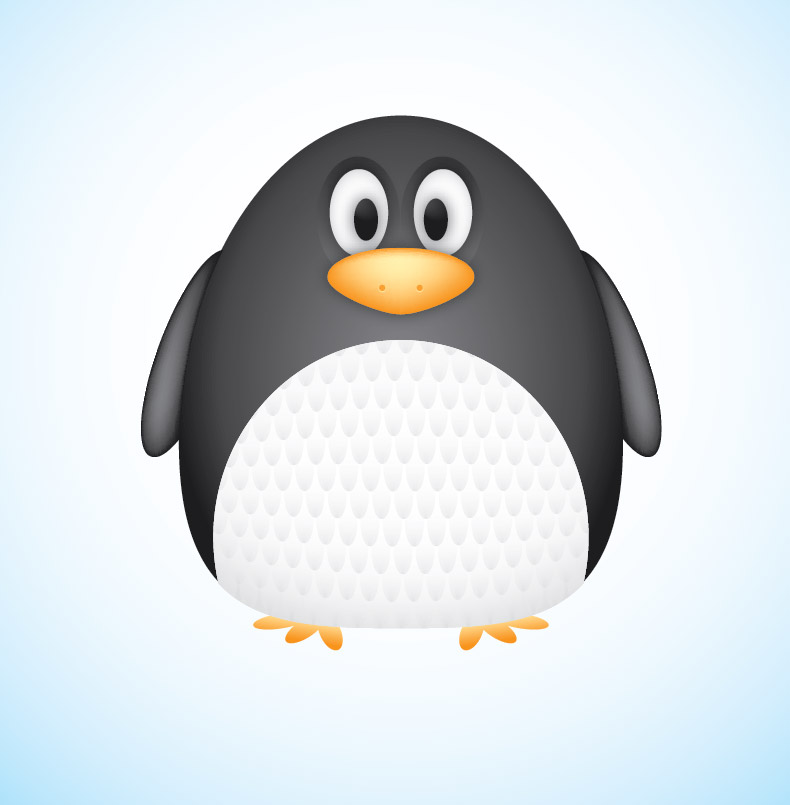
Follow this step by step Adobe Illustrator tutorial to create a simple vector penguin character. We’ll be using many of Illustrator’s basic shapes to create the structure of the character, which makes this tutorial great for beginners. We’ll then make use of various gradients to really bring the character to life with depth and dimension.

Create a Cute Vector Penguin Character in Illustrator

Read the article
Free Website Builder
Follow this step by step Adobe Illustrator tutorial to create a simple vector penguin character. We’ll be using many of Illustrator’s basic shapes to create the structure of the character, which makes this tutorial great for beginners. We’ll then make use of various gradients to really bring the character to life with depth and dimension.

Vector Penguin character
Here’s our cute little chubby penguin character we’ll be creating as part of this tutorial. The whole body is created from various circles and ovals which help give the penguin that cute and friendly appearance, while the gradients and shading help lift the character from the screen with a three dimensional illusion.
Open up Adobe Illustrator and draw an oval on the artboard, then select and drag the lower most point vertically upwards with the Direct Selection Tool.
Overlap another oval shape to outline the belly fur, then align the two shapes centrally along the Y-Axis.

We’ll need to trim down this new shape so copy (CMD+C) and paste in front (CMD+F) a duplicate of the original body outline and send it to the top (CMD+Shift+]). Select this duplicate along with the belly shape and hit the Intersect option from the Pathfinder palette to trim it to size.
Draw another oval to act as a wing. Paste in another copy of the body and use it to trim down the wing shape.
Copy and paste another wing onto the artboard then go to Object > Transform > Reflect. Position the new wing on the opposite side of the body.
Draw a basic foot using three angled ovals. Merge them all together with the Pathfinder palette, copy, flip and position a duplicate on the other side.
Create an eye using three differently sized circles. Offset the pupil to give the penguin a cute dazed look. Copy, paste and flip a duplicate of the eye shapes and position them next to the originals.
Use another oval as the penguin’s beak, but drag the lower most point downwards and adjust the bezier handles to make a slight point on the lower edge.
Now the basic structure and linework is complete we can begin bringing the character to life with colour. Replace the default fill and stroke with a grey to black gradient then adjust the angle so it flows radially from the centre of the body.
Give the eyes a subtle gradient of their own using a soft grey to white. Adjust the gradient shape to match the outline of the eyeball.
Use a similar grey to white gradient on the belly shape. Adjust this gradient so the lower portion has more grey shading to give a three dimensional appearance.
For the wings we’ll use the Gradient Mesh tool. Fill the wings with black first of all, then make a single click in the lower portion of the wing. Select a lighter shade of grey to add this colour to the gradient mesh point. Illustrator will automatically flow the gradient across the shape.
Add another gradient mesh to the beak, but this time start with an orange base colour and add a light yellow tone near the top edge to act as a highlight.
Create a couple of nostrils by overlapping two circles. The bottom circle should be the lighter yellow tone to create a kind of highlight effect.

 Add the grey to black gradient to the two remaining circles around the eyes as linear gradients, then reduce the opacity to around 50%
Our penguin is really starting to come to life now it has colour, but there’s a couple more little touches that will help add more definition.
Select the beak and eyes then go to Effect > Stylize > Drop Shadow. Alter the offset to zero then add the effect.
Elsewhere on the artboard draw a small oval with a grey to transparent linear gradient fill.
Hold Shift and Alt to drag a duplicate horizontally, then repeatedly press CMD+D to create a complete line. Hold Alt while dragging a copy of the whole line to create an offset row, then press CMD+D until you have a whole series of patterned shapes.
Group all the shapes together then overlay them over the penguin’s belly area. We’ll need to copy the belly shape to use as a tool with the Pathfinder so press CMD+2 to lock the pattern shape so you can select the underlying elements.
Paste in the belly duplicate and send it to the top (CMD+Shift+]), then with both elements selected (CMD+Alt+2 to unlock all) hit the Crop button from the Pathfinder palette.
Go to Object > Envelop Distort > Make with Warp and select the Bulge effect. Adjust the setting to give the feather pattern a more three dimensional appearance.
Convert the envelope distort effect to solid shapes by heading to Object > Expand and selecting just the Object checkbox.
The pattern has broken out of the original belly outline, so paste in another copy of the shape and repeat the Crop function from the Pathfinder to trim everything back to size.
Adjust the opacity of the feather pattern elements so they add to the detail of the character but aren’t too overpowering.
Our cute vector penguin is now complete. We’ve managed to create a whole character using nothing other than circles and ovals, with the help of gradients and shadows to add a touch of depth and dimension to the design.
Posted in Illustrator Tutorials by Chris Spooner


সোমবার, ৭ এপ্রিল, ২০১৪

আপনার ব্লগ এ যোগ করুন একটি FLOATING-হ্যালো বার | আপনার ওয়েবসাইট কে করে তুলুন আরও আকর্ষণীয় !!!

0
আসসালামুয়ালাইকুম, কেমন আছেন ?? আপনারা জারা এই পোস্ট টা পড়ছেন, তাদের হয়ত নিজের কোন ওয়েবসাইট রয়েছে , আমাদের প্রায় সবারই ইচ্ছা আমাদের ব্লগ কে আরও  আকর্ষণীয় করে তুলা...। এবং আমাদের ব্লগের পোস্ট কে আরও বেশি পপুলার করা।
আজ আপনাদের এমন একটা widget/plugins এর সাথে, যা আপনি তাদের ওয়েবসাইট থেকে তৈরি করতে পারবেন, এবং ওইখান থেকেই CUSTOMIZE করতে পারবেন, এবং :D :D আপনার ব্লগ এ আবার এডিট করতে হবে না, এইটা AUTOMATIC এফেক্ট করবে। ।
যা দেকতে নিচের ছবির মত।
তাহলে আল্লাহর নাম নিয়ে শুরু করা যাক,
  • প্রথমে তাদের ওয়েবসাইট এ জান HELLOBAR.COM এ যান।  তাপর আপনার ওয়েবসাইট এর লিঙ্ক দিয়ে এইখানে ক্লিক করুন "Create your First Bar" আপনারা যদি ডেমো দেখতে চান তাহলে এইখানে দেখতে পারেন,
তারপর যেকোনো একটা সিলেক্ট করুন যেমন "DRIVE TRAFFIC" এবং "CHOOSE" এ ক্লিক করুন।
তারপর আপনি BAR TEXT এ যা ইচ্ছা তাই লিখুন,
তারপর আপনি অ্যাকাউন্ট তৈরি করুন।
তারপর "I can install code myself" এ ক্লিক করুন, তারপর একটা পেজ আসবে অইখানে কোড থাকবে, কোড এর উপর ক্লিক করুন, কোড গুলা automatic কপি হই যাবে, কোড গুলা কপি করে NOTEPAD এ রাখুন,

কিভাবে এইটা আপনার ওয়েবসাইট অথবা ব্লগার ব্লগে এড করবেন,

আপনার ব্লগার এ যান তারপর TEMPLATE > EDIT HTML এবং এই কোড টা খুজে বের করুন, </head> , আপনার কপি করা কোড, </head> এর ঠিক উপরে/ আগে এড করে সেভ করুন,
আপনি আপনার hello bar ড্যাশবোর্ড এ আপনার বার এডিট করতে পারবেন,
কোন প্রবলেম হইলে কমেন্ট করে জানাবেন,
লেখা টিউন করেছেন : | (টেকটিউনস থেকে নেয়া )


© 2013 iPRESS. All rights resevered. Designed by Templateism